Node.js Quickstart
Get Zenovay Analytics up and running in your Node.js application in under 5 minutes.
Overview
For server-side Node.js applications, Zenovay provides a simple External API that you can call directly with fetch. No npm package is required.
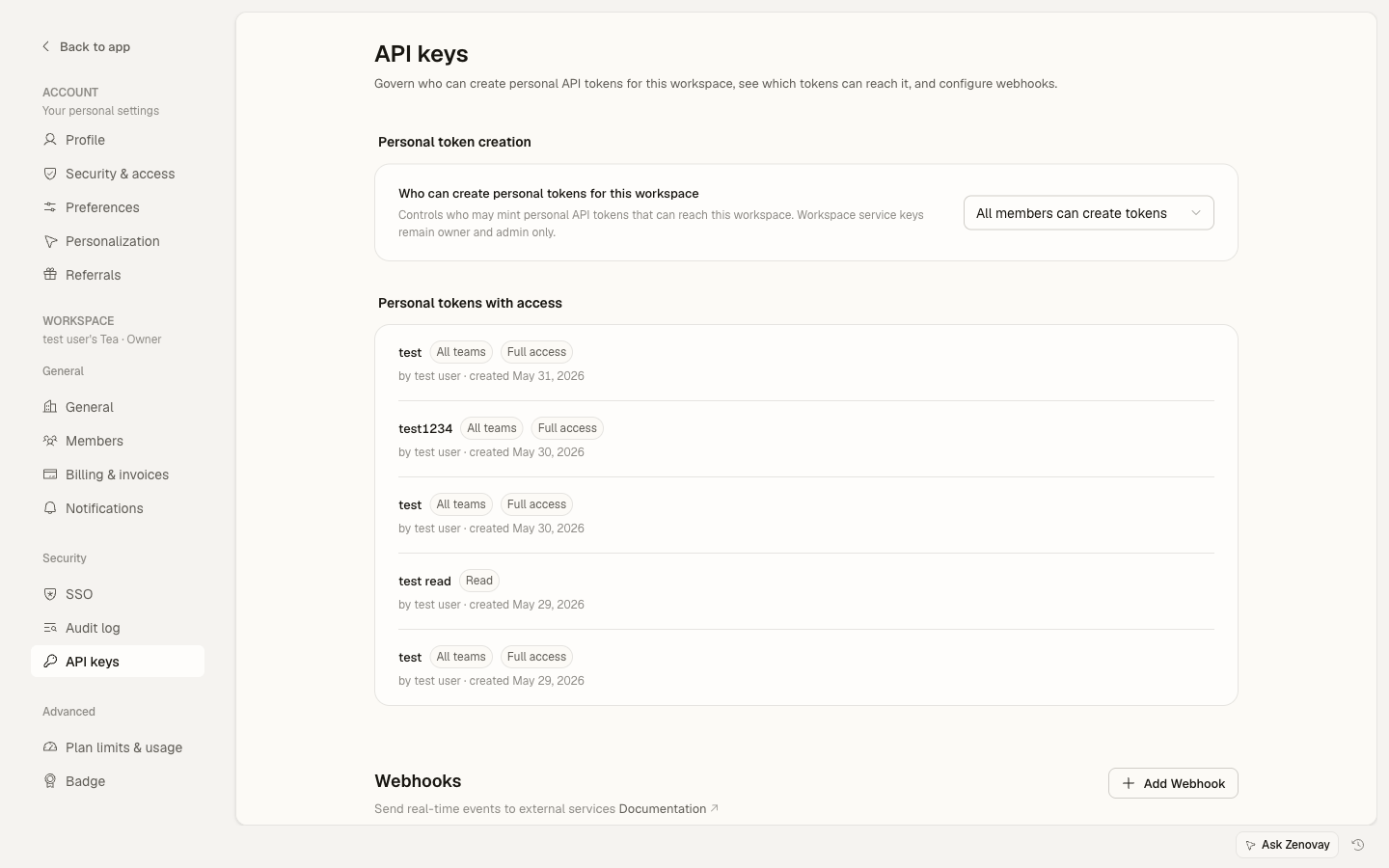
Get your API key from Settings → Security → API keys in the Zenovay Dashboard. Keep it secure and never expose it in client-side code.
Setup
1. Environment Variables
Store your API key securely using environment variables:
ZENOVAY_API_KEY=zv_prod_abc123xyz456
ZENOVAY_PROJECT_ID=proj_789
Never commit your .env file to version control. Add it to .gitignore to keep your API keys secure.
2. Create a Zenovay Helper
Create a lightweight helper module to interact with the Zenovay External API:
require('dotenv').config();

const ZENOVAY_API_URL = 'https://api.zenovay.com/api/external/v1';
const ZENOVAY_API_KEY = process.env.ZENOVAY_API_KEY;

async function track(event, properties = {}, userId = null) {
try {
  const response = await fetch(`${ZENOVAY_API_URL}/events`, {
    method: 'POST',
    headers: {
      'Content-Type': 'application/json',
      'X-API-Key': ZENOVAY_API_KEY,
    },
    body: JSON.stringify({
      event,
      userId,
      properties,
      timestamp: new Date().toISOString(),
    }),
  });

  if (!response.ok) {
    console.error('Zenovay API error:', response.status);
  }
} catch (error) {
  console.error('Zenovay tracking error:', error.message);
}
}

async function identify(userId, traits = {}) {
try {
  const response = await fetch(`${ZENOVAY_API_URL}/identify`, {
    method: 'POST',
    headers: {
      'Content-Type': 'application/json',
      'X-API-Key': ZENOVAY_API_KEY,
    },
    body: JSON.stringify({
      userId,
      traits,
      timestamp: new Date().toISOString(),
    }),
  });

  if (!response.ok) {
    console.error('Zenovay API error:', response.status);
  }
} catch (error) {
  console.error('Zenovay identify error:', error.message);
}
}

module.exports = { track, identify };
Track Events
Track custom events like sign-ups, purchases, or any user action:
const { track } = require('./lib/zenovay');

// Track user sign up
await track('user_signup', {
email: user.email,
plan: 'free',
source: 'organic',
}, user.id);

// Track a purchase
await track('purchase', {
product_id: 'pro-plan',
price: 29.99,
currency: 'USD',
}, user.id);
Identify Users
Associate events with specific users:
const { identify } = require('./lib/zenovay');

await identify(user.id, {
email: user.email,
name: user.name,
plan: 'pro',
created_at: user.createdAt,
});
Express.js Integration
Track page views and events in your Express.js application:
const express = require('express');
const { track } = require('./lib/zenovay');

const app = express();

// Track all API requests
app.use((req, res, next) => {
track('api_request', {
  path: req.path,
  method: req.method,
  userAgent: req.get('user-agent'),
}, req.user?.id);
next();
});

app.listen(3000, () => {
console.log('Server running on port 3000');
});
Complete Example
Here's a complete Express.js example with Zenovay integration:
const express = require('express');
require('dotenv').config();

const app = express();
app.use(express.json());

// Zenovay API helper
const ZENOVAY_API_URL = 'https://api.zenovay.com/api/external/v1';
const ZENOVAY_API_KEY = process.env.ZENOVAY_API_KEY;

async function track(event, properties = {}, userId = null) {
try {
  await fetch(`${ZENOVAY_API_URL}/events`, {
    method: 'POST',
    headers: {
      'Content-Type': 'application/json',
      'X-API-Key': ZENOVAY_API_KEY,
    },
    body: JSON.stringify({ event, userId, properties }),
  });
} catch (error) {
  console.error('Zenovay error:', error.message);
}
}

async function identify(userId, traits = {}) {
try {
  await fetch(`${ZENOVAY_API_URL}/identify`, {
    method: 'POST',
    headers: {
      'Content-Type': 'application/json',
      'X-API-Key': ZENOVAY_API_KEY,
    },
    body: JSON.stringify({ userId, traits }),
  });
} catch (error) {
  console.error('Zenovay error:', error.message);
}
}

// Track API requests
app.use((req, res, next) => {
track('page_view', {
  path: req.path,
  method: req.method,
});
next();
});

// API endpoint example
app.post('/api/users/signup', async (req, res) => {
const { email, name } = req.body;

// Your user creation logic here
const user = await createUser(email, name);

// Track signup event
await track('user_signup', {
  email: user.email,
  name: user.name,
}, user.id);

// Identify user
await identify(user.id, {
  email: user.email,
  name: user.name,
  created_at: new Date().toISOString(),
});

res.json({ success: true, user });
});

app.listen(3000, () => {
console.log('Server running with Zenovay Analytics');
});
API Reference
The External API supports these endpoints:
| Endpoint | Method | Description |
|---|---|---|
/e/{trackingCode} | POST | Track events (pageviews, custom events, identify) |
/api/external/v1/analytics/{websiteId} | GET | Query analytics data |
/api/external/v1/websites | GET | List websites |
The tracking endpoint (/e/) accepts events directly. The External API endpoints (/api/external/v1/) require the X-API-Key header.
Next Steps
You're all set! Your Node.js application is now tracking analytics with Zenovay.
Continue learning:
- Custom Events - Track specific user actions
- API Reference - Full API documentation
- Privacy-first — cookieless mode, GPC and Do Not Track
On this page