Ghost Integration
Add Zenovay to any Ghost publication (Ghost(Pro), self-hosted Ghost CMS, or Ghost Cloud) in two minutes. Ghost's Code Injection is fully exposed on every plan, so this integration works for free-tier creators and self-hosted publishers alike.
Code Injection is available on all Ghost plans, including self-hosted Ghost CMS. No upgrade required.
Quick Start
| Step | Where | What you do |
|---|---|---|
| 1 | Zenovay dashboard | Copy your tracking snippet |
| 2 | Ghost admin → Settings → Code injection → Site Header | Paste it |
| 3 | Save | Click Save |
| 4 | Zenovay dashboard | Real-time visitors appear within ~30 seconds |
Method 1: Site Header injection (Recommended)
Ghost's Code Injection panel writes raw HTML into the <head> of every page rendered by your theme. This includes the homepage, posts, pages, tags, authors, and the membership flow.
Step-by-step
- Log in to your Ghost admin panel (usually
https://your-site.com/ghost/). - From the left sidebar, click Settings.
- Scroll down to Site → Code injection.
- In the Site Header box, paste:
<script defer data-tracking-code="YOUR_TRACKING_CODE" src="https://api.zenovay.com/z.js"></script>
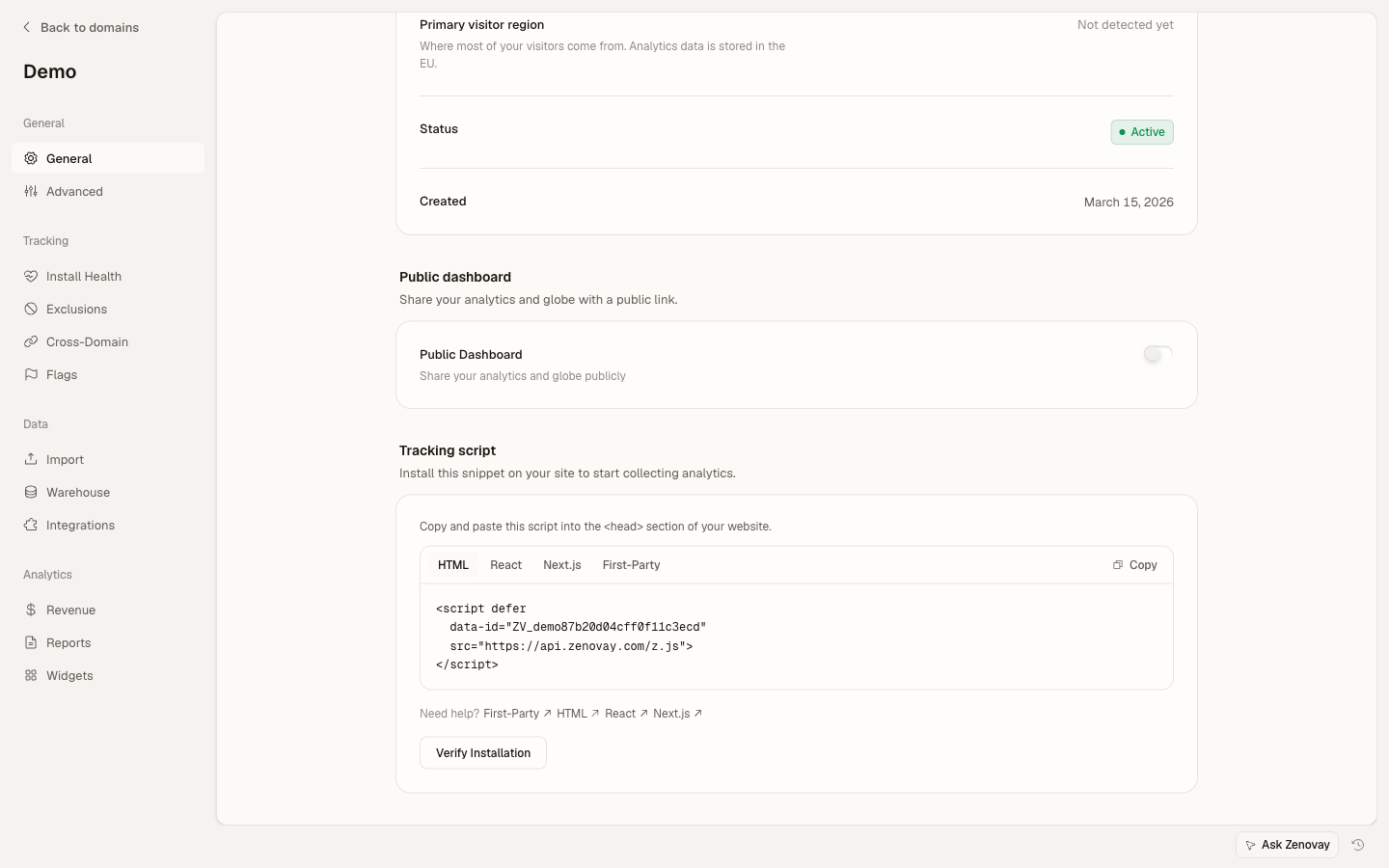
- Click Save.
Verify
Open your Ghost site in incognito and view source — you should see <script defer data-tracking-code=...> between <head> and </head>. Your visit should appear in the Zenovay real-time view within ~30 seconds.
Method 2: Per-post / per-page injection
For tracking only a specific post or page (e.g. a paid newsletter announcement), open the post in the editor and use the post-level Code Injection:
- Open a post or page in the editor.
- Click the gear icon (settings) in the top-right.
- Scroll down and expand Code injection.
- Paste the snippet into Post Header.
- Update the post.
Per-post Code Injection is appended after site-wide Code Injection. Don't paste the tracker in both — you'll double-count.
Tracking custom events
After the tracker loads you can call window.zenovay() from any Ghost theme template, Code Injection block, or post Markdown HTML embed.
Track newsletter signups
Ghost's signup forms emit a members:signup custom event on success. Add this to Site Header → Code injection (after the tracker line):
<script>
  document.addEventListener('DOMContentLoaded', () => {
    document.addEventListener('submit', (e) => {
      const form = e.target;
      if (form?.matches('[data-members-form]')) {
        if (window.zenovay) {
          window.zenovay('track', 'signup', {
            form_type: form.dataset.membersForm || 'signup',
            page: window.location.pathname,
          });
        }
      }
    }, true);
  });
</script>
Track paid subscription clicks (Subscribe / Upgrade)
Ghost renders subscribe / portal-trigger buttons with data-portal attributes. Listen for clicks:
<script>
  document.addEventListener('DOMContentLoaded', () => {
    document.addEventListener('click', (e) => {
      const target = e.target.closest('[data-portal]');
      if (target && window.zenovay) {
        window.zenovay('track', 'portal_opened', {
          action: target.dataset.portal,
          page: window.location.pathname,
        });
      }
    }, true);
  });
</script>
Identify members
Ghost exposes the current member through /members/api/member/. Fetch and identify on every page:
<script>
  fetch('/members/api/member/', { credentials: 'include' })
    .then(r => r.ok ? r.json() : null)
    .then(member => {
      if (member && window.zenovay) {
        window.zenovay('identify', {
          userId: member.uuid,
          email: member.email,
          name: member.name,
          plan: member.subscriptions?.[0]?.plan?.nickname,
        });
      }
    })
    .catch(() => {});
</script>
Tracking paid conversions
For revenue attribution on paid memberships, use Ghost's Stripe webhook integration and send Stripe events to Zenovay via our server-side tracking API. Client-side tracking misses subscription events that complete after the user has closed the tab (Ghost emails the receipt asynchronously).
Quick server-side example (Node.js on your own webhook receiver):
// Forward Stripe checkout.session.completed → Zenovay
app.post('/webhooks/stripe', async (req, res) => {
  const event = req.body;
  if (event.type === 'checkout.session.completed') {
    const session = event.data.object;
    await fetch('https://api.zenovay.com/v1/track', {
      method: 'POST',
      headers: {
        'Content-Type': 'application/json',
        'Authorization': `Bearer ${process.env.ZENOVAY_API_KEY}`,
      },
      body: JSON.stringify({
        event: 'purchase',
        userId: session.customer_email,
        properties: {
          transaction_id: session.id,
          revenue: session.amount_total / 100,
          currency: session.currency,
        },
      }),
    });
  }
  res.json({ received: true });
});
Working with custom Ghost themes
If you maintain a custom Ghost theme (e.g. forked from Casper, Source, or Edition), Code Injection is rendered via the {{ghost_head}} helper. As long as your theme's default.hbs includes:
{{!-- in default.hbs --}}
{{ghost_head}}
…then Zenovay loads correctly. Most third-party Ghost themes include this by default. If yours doesn't, add it inside <head> before </head>.
Plan requirements
| Ghost edition | Code Injection | Custom themes | Server-side tracking |
|---|---|---|---|
| Ghost(Pro) Starter | ✅ | ❌ (Casper only) | ✅ via webhooks |
| Ghost(Pro) Creator | ✅ | ✅ | ✅ |
| Ghost(Pro) Team / Business | ✅ | ✅ | ✅ |
| Self-hosted Ghost CMS | ✅ | ✅ | ✅ |
Common gotchas
{{ghost_head}} missing in custom themes. This is the #1 issue for custom-themed sites. If the tracker doesn't appear in page source, check that your default.hbs includes the helper. Without it, Code Injection has nowhere to render.
AMP posts. If you've enabled AMP via the Ghost AMP integration, Code Injection does not apply to /your-post/amp/ URLs (AMP strips arbitrary scripts). Either disable AMP or accept that AMP traffic isn't tracked. As of Ghost 5.x AMP is being de-emphasized; we recommend disabling it.
Newsletter emails. Code Injection only applies to your website, not to outbound newsletter emails. Email opens are tracked by Ghost itself; you can sync that data via the Ghost Admin API into Zenovay if desired, but it's not in-scope for the basic integration.
Member-only posts. The tracker fires on every page render, including member-gated previews. If you only want to track post views after the paywall is unlocked, gate your custom event on the /members/api/member/ response above.
Self-hosted Ghost on Docker / Kubernetes. No additional config needed — Code Injection lives in the Ghost database, not the filesystem. Just paste the snippet through the admin UI as usual.
Troubleshooting
| Symptom | Likely cause | Fix |
|---|---|---|
| No data | Tracker not in page source | Check that {{ghost_head}} is present in default.hbs |
| No data on some posts | Per-post Code Injection overriding | Move snippet to site-wide Header |
| Double pageviews | Snippet in both Site Header and per-post Code Injection | Pick one scope |
No data on /amp/ URLs | AMP strips scripts | Disable AMP or accept the gap |
| Members never identified | /members/api/member/ returns 404 | You're on an older Ghost (< 4.x) — upgrade |
Privacy & compliance
For cookieless tracking, add data-cookieless="true":
<script defer
        data-tracking-code="YOUR_TRACKING_CODE"
        data-cookieless="true"
        src="https://api.zenovay.com/z.js"></script>
Ghost's own member analytics use first-party cookies anyway, so layering Zenovay in cookieless mode is a common pattern: you keep Ghost's email-based member data, plus get cookieless visitor analytics on the rest of the site.
See Privacy Compliance for the full breakdown.
Related resources
- Tracking Script reference
- Custom Events
- Server-Side Tracking
- Revenue Attribution
- Ghost integration help article
Need help? Contact support@zenovay.com or visit our Help Center.