Add Zenovay Analytics to Nuxt
This guide walks through adding Zenovay Analytics to a Nuxt 3 app. Add the tracking script through nuxt.config.ts or a client-side plugin, and Zenovay starts recording page views, referrers, browser data, and geographic insights in real time. The tracker is under 1 KB, loads asynchronously, and automatically picks up client-side route changes through Vue Router. The guide covers both setup approaches plus custom event tracking with composables, user identification, cookieless mode, and SSR considerations for Nuxt 3.
Quick Setup (2 minutes)
There are two ways to add Zenovay to Nuxt. Pick whichever fits your project best.
Step 1: Get Your Tracking Code
Sign in to your Zenovay dashboard, open Domains → your site, and copy your tracking code from the General settings page.
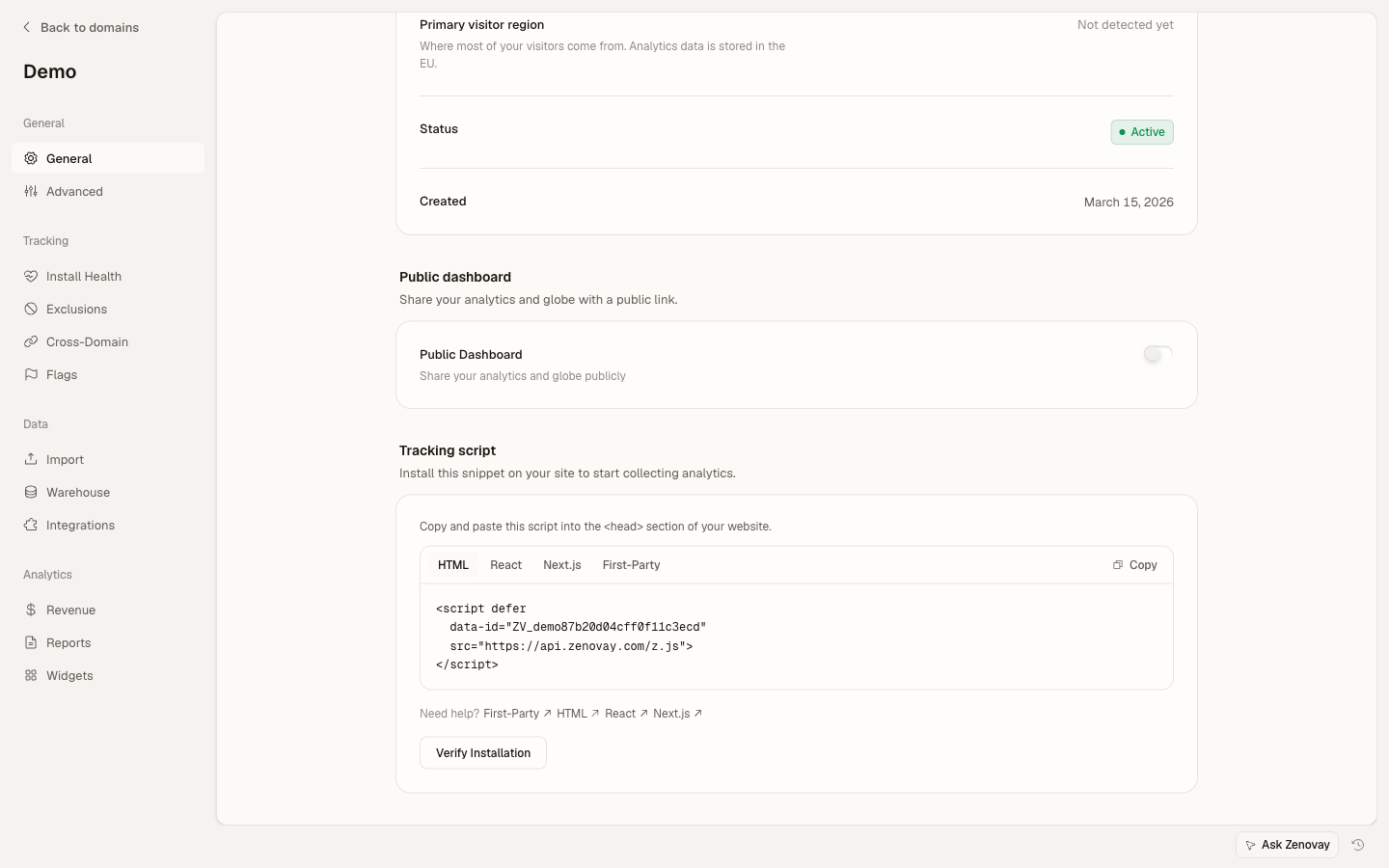
Option A: nuxt.config.ts (Recommended)
The simplest approach. Add the script to app.head in your Nuxt config:
export default defineNuxtConfig({
app: {
  head: {
    script: [
      {
        defer: true,
        'data-tracking-code': 'YOUR_TRACKING_CODE',
        src: 'https://api.zenovay.com/z.js',
      },
    ],
  },
},
})
That's it! Zenovay will automatically track page views across all your Nuxt routes, including client-side navigations.
Option B: Client-Side Plugin
If you prefer more control, create a Nuxt plugin that loads the script on the client:
export default defineNuxtPlugin(() => {
if (typeof document === 'undefined') return;

const script = document.createElement('script');
script.defer = true;
script.dataset.trackingCode = 'YOUR_TRACKING_CODE';
script.src = 'https://api.zenovay.com/z.js';
document.head.appendChild(script);
})
The .client.ts suffix ensures this plugin only runs in the browser, never during SSR.
Step 2: Verify Installation
Start your dev server with npx nuxi dev, visit a page, and check the Zenovay dashboard. You should see a real-time visitor within seconds.
SPA Navigation Tracking
Nuxt uses Vue Router for client-side routing. Zenovay automatically detects route changes via the History API (pushState / popstate), so every navigation records a new page view with zero configuration.
This works with:
<NuxtLink>componentsnavigateTo()programmatic navigationuseRouter().push()calls- Browser back/forward buttons
Custom Events with Composables
Create a reusable composable for clean analytics calls throughout your app:
export function useZenovay() {
function track(event: string, data?: Record<string, any>) {
  if (import.meta.client && window.zenovay) {
    window.zenovay('track', event, data);
  }
}

function identify(userId: string, traits?: Record<string, any>) {
  if (import.meta.client && window.zenovay) {
    window.zenovay('identify', userId, traits);
  }
}

function trackGoal(goalName: string, data?: Record<string, any>) {
  if (import.meta.client && window.zenovay) {
    window.zenovay('goal', goalName, data);
  }
}

function trackRevenue(amount: number, currency = 'USD') {
  if (import.meta.client && window.zenovay) {
    window.zenovay('revenue', amount, currency);
  }
}

return { track, identify, trackGoal, trackRevenue };
}
Nuxt auto-imports composables from the composables/ directory, so you can use it anywhere without an import statement:
<script setup lang="ts">
const { track } = useZenovay();

function handleUpgrade(plan: string) {
track('upgrade_clicked', { plan, location: 'pricing_page' });
navigateTo('/checkout?plan=' + plan);
}
</script>

<template>
<div>
  <h1>Pricing</h1>
  <button @click="handleUpgrade('pro')">Upgrade to Pro</button>
  <button @click="handleUpgrade('scale')">Upgrade to Scale</button>
</div>
</template>
Track Events in Components
<script setup lang="ts">
const { track } = useZenovay();

const form = reactive({ name: '', email: '', message: '' });

async function handleSubmit() {
track('form_submitted', {
  form: 'contact',
  has_message: form.message.length > 0,
});

await $fetch('/api/contact', { method: 'POST', body: form });
}
</script>

<template>
<form @submit.prevent="handleSubmit">
  <input v-model="form.name" placeholder="Name" required />
  <input v-model="form.email" type="email" placeholder="Email" required />
  <textarea v-model="form.message" placeholder="Message"></textarea>
  <button type="submit">Send</button>
</form>
</template>
Server-Side Rendering Considerations
Nuxt 3 renders pages on the server by default. The Zenovay script runs entirely on the client, so keep these rules in mind:
- Never call
window.zenovayin server middleware, API routes, orserver/files - Always guard client-side calls with
import.meta.clientorprocess.client - The
nuxt.config.tshead script is safe because the browser handles script loading - Use
.client.tssuffix for plugins that need thewindowobject
// ✅ Safe: guarded with import.meta.client
if (import.meta.client && window.zenovay) {
window.zenovay('track', 'page_view');
}

// ✅ Safe: inside onMounted (client-only lifecycle hook)
onMounted(() => {
if (window.zenovay) {
  window.zenovay('track', 'component_visible');
}
});

// ❌ Unsafe: runs during SSR — will throw!
// window.zenovay('track', 'page_view');
Route Middleware Tracking
Track specific route transitions with Nuxt route middleware:
export default defineNuxtRouteMiddleware((to, from) => {
// Only runs on client-side navigations
if (import.meta.client && window.zenovay) {
  window.zenovay('track', 'route_change', {
    from: from.fullPath,
    to: to.fullPath,
  });
}
})
This is optional. Zenovay auto-tracks page views on every navigation. Use route middleware only if you need custom data attached to specific transitions.
Cookieless Mode
For privacy-friendly tracking without cookies or localStorage, add the data-cookieless attribute:
export default defineNuxtConfig({
app: {
  head: {
    script: [
      {
        defer: true,
        'data-tracking-code': 'YOUR_TRACKING_CODE',
        'data-cookieless': 'true',
        src: 'https://api.zenovay.com/z.js',
      },
    ],
  },
},
})
In cookieless mode, Zenovay uses an in-memory, window-scoped visitor ID that exists only for the current page session. No cookies, no localStorage, and no data is written to the client device. The ID is discarded when the page unloads.
Identify Users
Associate analytics data with authenticated users. A good place is in your auth plugin or layout:
<script setup lang="ts">
const { identify } = useZenovay();
const { data: user } = await useFetch('/api/auth/user');

watch(user, (u) => {
if (u) {
  identify(u.id, {
    email: u.email,
    plan: u.plan,
  });
}
}, { immediate: true });
</script>

<template>
<div>
  <NuxtPage />
</div>
</template>
Track Goals and Revenue
const { trackGoal, trackRevenue } = useZenovay();

// Track a conversion goal
trackGoal('newsletter_signup', { source: 'footer' });

// Track a purchase
trackRevenue(49.99, 'USD');
TypeScript Support
Add type declarations for the global zenovay function. Nuxt auto-includes *.d.ts files from the project root:
declare global {
interface Window {
  zenovay?: (...args: any[]) => void;
}
}

export {};
Environment-Based Configuration
Use runtime config to swap tracking codes between environments:
export default defineNuxtConfig({
runtimeConfig: {
  public: {
    zenovayTrackingCode: 'YOUR_TRACKING_CODE',
  },
},
})export default defineNuxtPlugin(() => {
const config = useRuntimeConfig();
const trackingCode = config.public.zenovayTrackingCode;
if (!trackingCode || typeof document === 'undefined') return;
const script = document.createElement('script');
script.defer = true;
script.dataset.trackingCode = trackingCode;
script.src = 'https://api.zenovay.com/z.js';
document.head.appendChild(script);
})Then set NUXT_PUBLIC_ZENOVAY_TRACKING_CODE in your environment to override the default.
Next Steps
Your Nuxt app is now tracking with Zenovay! View your analytics in the dashboard.
Continue learning:
- Custom Events - Advanced event tracking patterns
- Goals - Set up conversion goals
- Privacy Compliance - GDPR and CCPA configuration
- Custom Frameworks - Generic integration guide