React Quickstart
Integrate Zenovay Analytics into your React application. No npm package needed, just a simple script tag.
Installation
Add the Zenovay tracking script to your HTML file:
<!DOCTYPE html>
<html lang="en">
<head>
  <meta charset="UTF-8" />
  <title>My React App</title>
</head>
<body>
  <div id="root"></div>
  <script defer data-tracking-code="YOUR_TRACKING_CODE" src="https://api.zenovay.com/z.js"></script>
</body>
</html>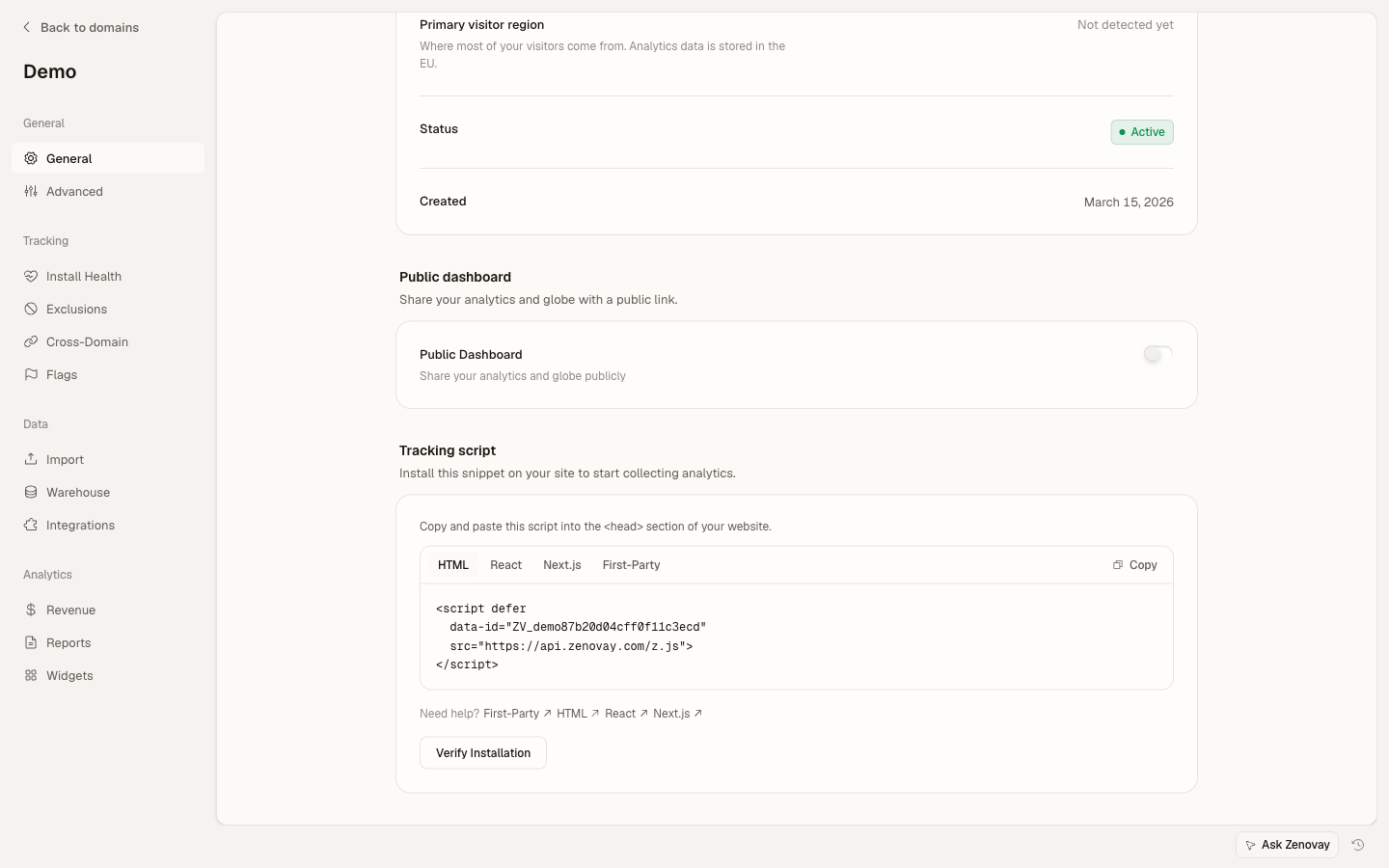
That's it for basic setup. Zenovay will automatically track page views.
Setup Helper Hook
Create a reusable hook for tracking custom events:
export function useZenovay() {
const track = (eventName: string, data?: Record<string, any>) => {
  if (window.zenovay) {
    window.zenovay('track', eventName, data);
  }
};

const identify = (userId: string, traits?: Record<string, any>) => {
  if (window.zenovay) {
    window.zenovay('identify', userId, traits);
  }
};

const trackGoal = (goalName: string, data?: Record<string, any>) => {
  if (window.zenovay) {
    window.zenovay('goal', goalName, data);
  }
};

const trackRevenue = (data: { order_id: string; value: number; currency?: string }) => {
  if (window.zenovay) {
    window.zenovay('revenue', data.value, data.currency || 'USD');
  }
};

return { track, identify, trackGoal, trackRevenue };
}
Environment Variables
# No special environment variables needed for Zenovay!
# The tracking code is embedded directly in the script tag.
# Replace YOUR_TRACKING_CODE in index.html with your actual
# tracking code from the Zenovay dashboard (app.zenovay.com).
Find your tracking code in the app under Domains, select your site, then open the General tab (the Tracking script card).
Track Events with Hook
Use the useZenovay hook to track custom events:
import { useZenovay } from '../hooks/useZenovay';
import { useState } from 'react';

export function SignupForm() {
const { track, identify } = useZenovay();
const [email, setEmail] = useState('');

const handleSubmit = async (e: React.FormEvent) => {
  e.preventDefault();

  // Your signup logic
  const user = await signup(email);

  // Track the signup
  track('user_signup', {
    email,
    source: 'signup_form',
    plan: 'free',
  });

  // Identify the user
  identify(user.id, {
    email: user.email,
    created_at: new Date().toISOString(),
  });
};

return (
  <form onSubmit={handleSubmit}>
    <input
      type="email"
      value={email}
      onChange={(e) => setEmail(e.target.value)}
      placeholder="Enter your email"
    />
    <button type="submit">Sign Up</button>
  </form>
);
}
Track Button Clicks
Track user interactions with buttons:
import { useZenovay } from '../hooks/useZenovay';

export function PricingCard({ plan }: { plan: string }) {
const { track } = useZenovay();

const handleUpgrade = () => {
  track('upgrade_clicked', {
    plan,
    location: 'pricing_page',
  });

  // Navigate to checkout
  window.location.href = '/checkout?plan=' + plan;
};

return (
  <div className="pricing-card">
    <h3>{plan} Plan</h3>
    <button onClick={handleUpgrade}>
      Upgrade Now
    </button>
  </div>
);
}
Track Page Views
Automatically track page views with React Router:
import { BrowserRouter, Routes, Route, useLocation } from 'react-router-dom';
import { useEffect } from 'react';

function PageTracker() {
const location = useLocation();

useEffect(() => {
  if (window.zenovay) {
    window.zenovay('track', 'pageview', {
      path: location.pathname,
      search: location.search,
    });
  }
}, [location.pathname]);

return null;
}

function App() {
return (
  <BrowserRouter>
    <PageTracker />
    <Routes>
      <Route path="/" element={<Home />} />
      <Route path="/dashboard" element={<Dashboard />} />
    </Routes>
  </BrowserRouter>
);
}
Identify Users
Identify users when they log in:
import { useZenovay } from '../hooks/useZenovay';
import { useEffect } from 'react';

export function UserProfile({ user }: { user: User }) {
const { identify } = useZenovay();

useEffect(() => {
  if (user) {
    identify(user.id, {
      email: user.email,
      name: user.name,
      plan: user.subscription?.plan || 'free',
      created_at: user.createdAt,
    });
  }
}, [user]);

return <div>Welcome, {user.name}!</div>;
}
Track Form Submissions
Track form interactions and completions:
import { useZenovay } from '../hooks/useZenovay';
import { useState } from 'react';

export function ContactForm() {
const { track } = useZenovay();
const [formData, setFormData] = useState({ name: '', email: '', message: '' });

const handleChange = (field: string, value: string) => {
  setFormData(prev => ({ ...prev, [field]: value }));

  // Track form field interactions
  track('form_field_filled', {
    form_name: 'contact_form',
    field_name: field,
  });
};

const handleSubmit = async (e: React.FormEvent) => {
  e.preventDefault();

  track('form_submitted', {
    form_name: 'contact_form',
    has_message: formData.message.length > 0,
  });

  // Submit form logic
  await submitContact(formData);
};

return (
  <form onSubmit={handleSubmit}>
    <input
      type="text"
      value={formData.name}
      onChange={(e) => handleChange('name', e.target.value)}
      placeholder="Name"
    />
    <input
      type="email"
      value={formData.email}
      onChange={(e) => handleChange('email', e.target.value)}
      placeholder="Email"
    />
    <textarea
      value={formData.message}
      onChange={(e) => handleChange('message', e.target.value)}
      placeholder="Message"
    />
    <button type="submit">Send Message</button>
  </form>
);
}
TypeScript Support
Add type declarations for the global zenovay object:
declare global {
interface Window {
  zenovay?: (...args: any[]) => void;
}
}

export {};
Testing in Development
You can verify events are being sent by checking the Network tab in your browser's developer tools for requests to api.zenovay.com. The Zenovay dashboard also provides real-time event monitoring.
Make sure to replace YOUR_TRACKING_CODE in index.html with your actual tracking code from the Zenovay dashboard.
Next Steps
Your React app is now tracking with Zenovay! View your analytics in the dashboard.
Continue learning:
- Custom Events - Advanced event tracking
- Visitor Identification - User tracking best practices
- Privacy Compliance - GDPR and CCPA setup