First-Party Tracking with Vercel
Set up a first-party proxy on Vercel. This guide covers both vercel.json rewrites and Edge Middleware options.
Difficulty: Easy - Works with any framework deployed on Vercel. Just add a config file.
Why This Works (Same-Origin)
This approach uses /api/_z/script.js which is on the same origin as your website. Firefox ETP and other tracking protections only block cross-origin requests.
- Browser sees:
yourdomain.com/api/_z/script.js→ Same origin ✅ - Vercel rewrites the request to Zenovay server-side (browser never sees this)
- All tracking protection is bypassed because the request is first-party
The proxied script stops honouring Do Not Track
Every bundle served through /api/_z/script.js ships with ignoreDNT enabled, so a visitor whose browser sends the legacy Do Not Track signal is still tracked on a proxied site, whether or not you asked for that. Global Privacy Control is never overridden and is still honoured. If Do Not Track matters for your audience, serve the standard script from api.zenovay.com instead. See Privacy-first.
Before You Start
Make sure you have:
- A project deployed on Vercel
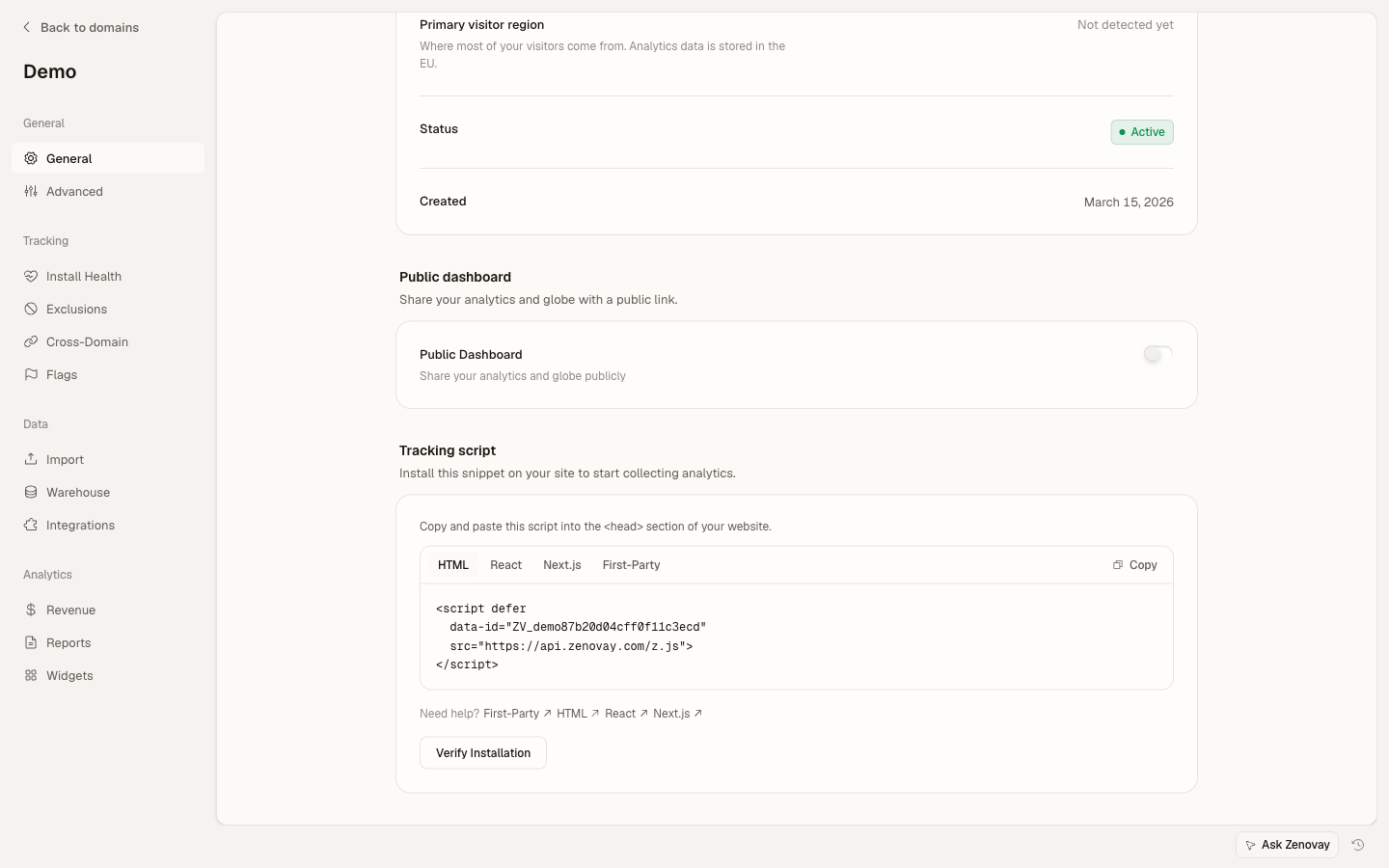
- Your Zenovay tracking code (found under Domains → your site → General)
- Access to your project's configuration files
Your Tracking Code Format
Your tracking code looks like: ZV_XXXXXXXXXX
- Starts with
ZV_ - Followed by 10 characters (letters and numbers)
- CASE-SENSITIVE - copy it exactly
Example: ZV_Q8U0GYD70WR
Option 1: Using vercel.json (Simplest)
The easiest approach is to add rewrites to your vercel.json:
Step 1: Create or Update vercel.json
Add the following rewrite rule to your vercel.json file in your project root:
{
"rewrites": [
  {
    "source": "/api/_z/:path*",
    "destination": "https://api.zenovay.com/fp/:path*"
  }
]
}
If you already have a vercel.json, add the rewrite to your existing rewrites array:
{
"buildCommand": "npm run build",
"outputDirectory": "dist",
"rewrites": [
  {
    "source": "/api/_z/:path*",
    "destination": "https://api.zenovay.com/fp/:path*"
  }
]
}
Step 2: Add the Tracking Script
<script defer
data-tracking-code="YOUR_TRACKING_CODE"
src="/api/_z/script.js">
</script>
Step 3: Deploy
vercel deployThat's it! The rewrite handles everything automatically.
Option 2: Using Edge Middleware (More Control)
Edge Middleware gives you more control over the proxy behavior, including the ability to forward the real client IP.
Step 1: Create Middleware File
Create a middleware.ts file in your project root (or src/ if you use that structure):
import { NextResponse } from 'next/server'
import type { NextRequest } from 'next/server'

export function middleware(request: NextRequest) {
// Only handle /api/_z/* routes
if (!request.nextUrl.pathname.startsWith('/api/_z/')) {
  return NextResponse.next()
}

// Build the target URL
const path = request.nextUrl.pathname.replace('/api/_z/', '')
const targetUrl = new URL(`https://api.zenovay.com/fp/${path}`)
targetUrl.search = request.nextUrl.search

// Forward the real client IP for accurate geolocation
const clientIP = request.headers.get('x-forwarded-for')?.split(',')[0]
              || request.headers.get('x-real-ip')
              || ''

// Forward the IP and the proxy key as REQUEST headers of the rewrite
const requestHeaders = new Headers(request.headers)
if (clientIP) {
  requestHeaders.set('X-Zenovay-Real-IP', clientIP)
}
requestHeaders.set('X-Zenovay-Proxy-Key', process.env.ZENOVAY_PROXY_KEY || '')

return NextResponse.rewrite(targetUrl, { request: { headers: requestHeaders } })
}

export const config = {
// Only run middleware on /api/_z/* paths
matcher: '/api/_z/:path*',
}
Why Edge Middleware? Vercel's vercel.json rewrites work well, but middleware allows you to:
- Forward the real client IP for accurate geolocation
- Add custom headers
- Implement conditional logic
- Log requests
Step 2: Add the Tracking Script
<script defer
data-tracking-code="YOUR_TRACKING_CODE"
src="/api/_z/script.js">
</script>
Step 3: Deploy
vercel deployFramework-Specific Examples
React (Create React App)
{
"rewrites": [
  { "source": "/api/_z/:path*", "destination": "https://api.zenovay.com/fp/:path*" }
]
}<!DOCTYPE html>
<html lang="en">
<head>
<script defer data-tracking-code="YOUR_TRACKING_CODE" src="/api/_z/script.js"></script>
<!-- other head elements -->
</head>
<body>
<div id="root"></div>
</body>
</html>Vue.js
{
"rewrites": [
  { "source": "/api/_z/:path*", "destination": "https://api.zenovay.com/fp/:path*" }
]
}<!DOCTYPE html>
<html lang="en">
<head>
<script defer data-tracking-code="YOUR_TRACKING_CODE" src="/api/_z/script.js"></script>
</head>
<body>
<div id="app"></div>
</body>
</html>SvelteKit
{
"rewrites": [
  { "source": "/api/_z/:path*", "destination": "https://api.zenovay.com/fp/:path*" }
]
}<!DOCTYPE html>
<html lang="en">
<head>
<script defer data-tracking-code="YOUR_TRACKING_CODE" src="/api/_z/script.js"></script>
%sveltekit.head%
</head>
<body>
<div>%sveltekit.body%</div>
</body>
</html>Nuxt 3
{
"rewrites": [
  { "source": "/api/_z/:path*", "destination": "https://api.zenovay.com/fp/:path*" }
]
}<script setup>
useHead({
script: [
{
src: '/api/_z/script.js',
defer: true,
'data-tracking-code': 'YOUR_TRACKING_CODE'
}
]
})
</script>
<template>
<NuxtPage />
</template>Verify It's Working
Check the Network Tab
- Visit your deployed Vercel site
- Open DevTools (F12)
- Go to the Network tab
- Reload the page
- Look for
/api/_z/script.js
You should see:
- Status: 200
- Domain: Your Vercel domain
- Response: JavaScript code
Check Vercel Function Logs
If using middleware:
- Go to Vercel Dashboard → Your Project
- Click Logs (or Functions tab)
- Look for requests to
/api/_z/*
Test in Firefox Strict Mode
- Open Firefox
- Settings → Privacy & Security → Enhanced Tracking Protection: Strict
- Visit your site
- Verify the script loads successfully
Troubleshooting
Rewrite Returns 404
Cause: The rewrite path doesn't match or vercel.json isn't being read.
Solution:
- Verify
vercel.jsonis in your project root - Check the path pattern matches exactly:
/api/_z/:path* - Redeploy your project
Middleware Not Running
Cause: The matcher pattern doesn't match, or middleware file is in the wrong location.
Solution:
- Ensure
middleware.tsis in the project root (not insidepages/orapp/) - Check the matcher pattern:
'/api/_z/:path*' - For
src/directory projects, the file should be atsrc/middleware.ts
Geolocation Shows Wrong Location
Cause: Client IP not being forwarded.
Solution:
Use the Edge Middleware approach (Option 2) which forwards the x-forwarded-for header:
const clientIP = request.headers.get('x-forwarded-for')?.split(',')[0] || ''
const requestHeaders = new Headers(request.headers)
requestHeaders.set('X-Zenovay-Real-IP', clientIP)
requestHeaders.set('X-Zenovay-Proxy-Key', process.env.ZENOVAY_PROXY_KEY || '')
return NextResponse.rewrite(targetUrl, { request: { headers: requestHeaders } })
Script Loads But No Data
Cause: Tracking code mismatch or JavaScript errors.
Solution:
- Verify
data-tracking-codematches your code in Zenovay dashboard (case-sensitive) - Check browser console for JavaScript errors
- Ensure the website domain is added to Zenovay
Complete Example Project
Here's a minimal complete setup:
my-vercel-project/
├── vercel.json
├── public/
│   └── index.html
├── src/
│   └── App.jsx
└── package.json{
"rewrites": [
{
"source": "/api/_z/:path*",
"destination": "https://api.zenovay.com/fp/:path*"
}
]
}<!DOCTYPE html>
<html lang="en">
<head>
<meta charset="UTF-8">
<meta name="viewport" content="width=device-width, initial-scale=1.0">
<title>My App</title>
<script defer data-tracking-code="YOUR_TRACKING_CODE" src="/api/_z/script.js"></script>
</head>
<body>
<div id="root"></div>
<script type="module" src="/src/main.jsx"></script>
</body>
</html>Final Checklist
Before you're done, verify ALL of these:
-
vercel.jsonhas the rewrite rule (or middleware is set up) - Script tag uses
/api/_z/script.js(not the direct Zenovay URL) -
data-tracking-codeattribute contains your correct tracking code - Project is deployed (not just running locally)
- Tested in Firefox with Enhanced Tracking Protection set to Strict
- Visits appearing in Zenovay dashboard
Next Steps
- Custom Events - Track user interactions
- Visitor Identification - Link analytics to users
- Troubleshooting - More help with issues
On this page